Smartphone Tripods for Content Creators and Travelers

In the age of social media, personal vlogging, and digital content creation, capturing high-quality photos and videos on-the-go has become essential for content creators and travelers alike. However, holding your smartphone for extended periods or relying on shaky hands for video shooting often results in less-than-professional results. Enter smartphone tripods—compact, versatile tools that have revolutionized how creators and adventurers capture their moments. Whether you’re shooting a travel vlog, recording tutorials, or simply snapping some photos for Instagram, smartphone tripods offer the stability, flexibility, and convenience needed to elevate your content to the next level. In this article, we will dive into the importance of smartphone tripods, the different types available, and how you can use them to maximize your creative potential while traveling.
Why You Need a Smartphone Tripod

Smartphone tripods are becoming indispensable tools for both casual users and professional content creators. The need for steady, stable shots has grown as smartphones continue to improve in terms of camera quality. A tripod helps eliminate camera shake, enhances photo and video quality, and provides the flexibility to set up shots with ease.

For travelers, the portability and compact nature of smartphone tripods make them perfect companions for documenting your adventures. Whether you’re filming yourself in front of iconic landmarks, capturing the beauty of nature, or simply recording memories with friends, a tripod allows you to do so without requiring an extra set of hands or relying on awkward self-portraits.

For content creators, a tripod offers even more benefits. With adjustable angles, heights, and configurations, you can experiment with different shooting perspectives, from overhead shots to low-angle captures. Plus, a smartphone tripod frees up your hands, allowing you to engage with your audience, set up lighting, or adjust your surroundings while still filming in a professional, hands-free manner.

Types of Smartphone Tripods and How to Choose the Right One

With the vast variety of smartphone tripods available in the market, choosing the right one can be overwhelming. Whether you’re a traveler on the move or a content creator setting up your home studio, the type of tripod you select depends on your specific needs. Below are the most common types of smartphone tripods, each offering different features to accommodate different styles of shooting.

1. Mini Tripods

Mini tripods are compact, lightweight, and designed for on-the-go use. These tripods usually have adjustable legs and are small enough to fit in your bag or even your pocket. Their versatility makes them ideal for travelers who need a portable option without sacrificing stability.

Mini tripods are perfect for table-top shots, selfies, or when you’re filming in small spaces. They often come with flexible legs that can be bent to grip onto surfaces like tree branches or fence posts, making them perfect for outdoor shooting. Their small size also makes them easy to carry while hiking, sightseeing, or exploring new cities.

2. Full-Size Tripods

Full-size tripods offer greater height and stability than mini tripods, making them ideal for content creators who need a solid foundation for long-duration filming. These tripods are typically made from lightweight materials like aluminum or carbon fiber, ensuring both sturdiness and portability.

Full-size tripods are highly adjustable, allowing you to shoot from different angles, whether it’s capturing wide landscapes or filming yourself at a distance. They are ideal for those who create YouTube videos, tutorials, product reviews, or other types of content that require a stable and elevated shot.

Additionally, full-size tripods often come with added features such as adjustable heads for precise angle control, remote control triggers for hands-free operation, and even built-in Bluetooth functionality for seamless connectivity with your smartphone.

3. Flexible Tripods

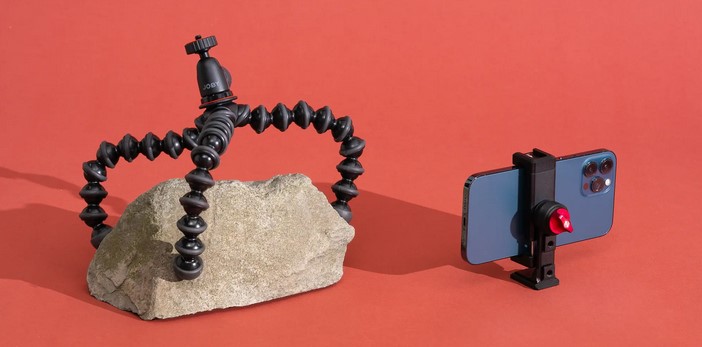
Flexible tripods, like the popular Joby Gorillapod, have gained immense popularity due to their unique design and ability to bend and wrap around various surfaces. The flexible legs are made of segments that can be rotated and adjusted, allowing them to cling to objects like tree branches, poles, or railings.

For travelers and content creators who are constantly shooting in diverse environments, flexible tripods offer unmatched versatility. These tripods can hold your smartphone at nearly any angle, even in hard-to-reach places. Whether you’re in a tight spot filming a travel adventure or trying to capture a shot on uneven terrain, flexible tripods provide maximum flexibility and stability.

4. Selfie Stick Tripods

Selfie stick tripods are a hybrid between a traditional selfie stick and a tripod. These tripods extend, allowing you to capture wide-angle shots of yourself or your surroundings. Some selfie stick tripods come with built-in Bluetooth shutters, so you can remotely trigger your phone’s camera.

These tripods are particularly popular among solo travelers or vloggers who want to capture themselves in scenic locations. Their portability and ease of use make them ideal for casual shooting, whether you’re traveling alone or with friends and need that perfect selfie or group shot.

5. Tabletop Tripods

Tabletop tripods are small, portable, and ideal for shooting from a fixed position. They often feature sturdy, non-slip feet and are perfect for desk setups, filming tutorials, or shooting close-up product shots. Tabletop tripods are particularly useful for indoor content creation, such as streaming, video conferencing, or cooking shows.

While they are small in size, tabletop tripods are versatile enough for a wide range of content creation activities. They are also compact enough to be used as a secondary tripod for travel purposes.

Tips for Using Smartphone Tripods While Traveling and Creating Content

Whether you’re a seasoned content creator or a travel enthusiast capturing special moments, there are a few tips that can help you get the most out of your smartphone tripod. Below are some helpful suggestions for using your tripod effectively:

1. Plan Your Shots in Advance

Before you start filming, take some time to plan your shots. Determine the angle, lighting, and framing that best suits your content. Setting up your tripod at the right distance and height will make your shots appear more professional and polished.

2. Use a Smartphone Mount or Clamp

While many smartphone tripods come with their own mounts, it’s a good idea to invest in a sturdy clamp or phone holder that is compatible with your tripod. This ensures that your phone stays secure while filming, even if you’re using a lightweight or flexible tripod.

3. Maximize Stability

For steady shots, always ensure that your tripod is placed on a stable surface. Avoid shooting in windy conditions or on unstable ground, as this can result in shaky footage. Consider using sandbags or tripod stabilizers when shooting in outdoor environments to reduce movement.

4. Incorporate Remote Shutter Triggers

Many smartphone tripods come with Bluetooth-enabled remote shutter triggers, allowing you to start and stop recording without having to touch your phone. This feature is particularly useful for solo travelers or vloggers who want to capture seamless, hands-free shots.

5. Experiment with Angles

One of the advantages of using a smartphone tripod is the ability to experiment with different angles. Try shooting from low, high, or side perspectives to add variety and interest to your content. Use the adjustable heads on full-size tripods or flexible tripods to capture creative and dynamic shots.

In conclusion, smartphone tripods are essential tools for both content creators and travelers looking to elevate their photography and videography. These versatile and portable devices provide the stability and flexibility needed to capture high-quality, professional-looking content, whether you’re filming on the go or creating content in a more controlled environment. With various types of tripods available—ranging from mini tripods to full-sized models—there’s an option for every shooting style and scenario. By selecting the right tripod and employing effective shooting techniques, you can ensure that your content looks polished and engaging. Whether you’re documenting your travel adventures or producing content for social media or YouTube, a smartphone tripod is an indispensable tool in today’s content creation landscape.

Wireless Charging Smartphones: Are They Really the Future of Mobile Power?

Source:https://cdn.thewirecutter.com

In recent years, the introduction of wireless charging smartphones has sparked a technological revolution, promising a future where tangled cables and charging ports are things of the past. The convenience of wire-free charging has caught the attention of both consumers and manufacturers, with many tech giants incorporating wireless charging into their flagship devices. But while the idea of a fully wireless charging ecosystem is alluring, the question remains: Are wireless charging smartphones really the future of mobile power? This article takes a closer look at the pros and cons of wireless charging and examines whether it can truly replace traditional wired charging methods in the long run.

The Rise of Wireless Charging Technology

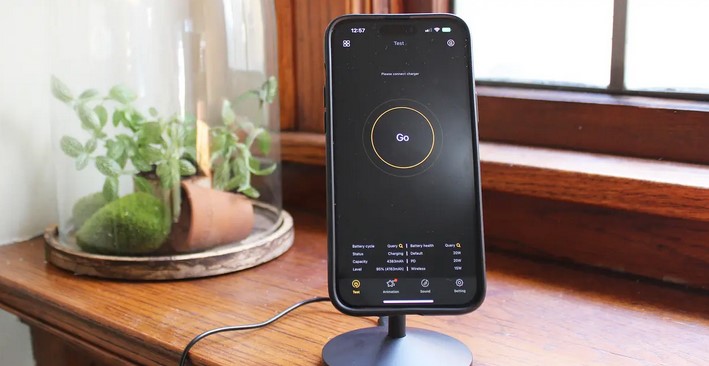
The concept of wireless charging is not new. In fact, it has been around for over a century, originally conceptualized by Nikola Tesla in the 1890s. However, it wasn’t until the last decade that the technology matured enough to be incorporated into consumer devices like smartphones. Wireless charging works on the principle of inductive charging, where an electromagnetic field transfers energy between two coils – one in the charging pad and one in the device itself. This transfer of power allows smartphones to charge without the need for a physical connection.

Early Adoption and Consumer Reception

As smartphones evolved, so did the demand for convenience. In 2012, Nokia became one of the first major smartphone brands to introduce wireless charging on its Lumia series, using the Qi wireless standard. Soon after, companies like Samsung, Apple, and Google followed suit, integrating wireless charging into their devices. Today, wireless charging is a standard feature on many high-end smartphones.

The appeal of wireless charging smartphones lies in the promise of effortless charging. No more plugging in a cable every time your phone runs low on power; instead, users can simply place their phone on a charging pad or mat. This convenience has led to widespread adoption, especially in public spaces such as airports, cafes, and restaurants, where charging stations are becoming more common.

However, while consumer reception has been generally positive, it’s not without its limitations. The technology, although promising, is still in its early stages of development, and there are several factors that may hinder its widespread adoption as the primary method of charging mobile devices.

Advantages of Wireless Charging

1. Convenience and Ease of Use

The most obvious advantage of wireless charging is its convenience. The process is incredibly simple: you place your smartphone on a charging pad, and it starts charging automatically. This eliminates the need to fumble with cables, especially in low-light conditions or when you’re in a hurry. For individuals who frequently use their phones for work or leisure, this convenience cannot be overstated.

Wireless charging also reduces wear and tear on the physical charging port. Over time, charging ports on smartphones can become damaged due to frequent plugging and unplugging. Wireless charging smartphones eliminate this issue, offering a longer lifespan for the device and the charging port.

2. Reduced Cable Clutter

Another benefit of wireless charging is the reduction of cable clutter. Many people have a multitude of charging cables for different devices, leading to tangled messes and the need for multiple charging stations. Wireless charging pads offer a cleaner, more organized solution, allowing users to charge multiple devices simultaneously without the need for an array of cables. This is particularly useful in homes, offices, and public spaces.

3. Potential for Future Innovations

Wireless charging also opens the door for future innovations. For instance, researchers are working on long-range wireless charging systems, which could charge smartphones from several feet away. While these systems are still in the experimental stage, they represent the potential for a future where users can charge their devices simply by being in range of a charging station, without needing to physically place their phones on a pad.

Challenges and Limitations of Wireless Charging

Despite the numerous advantages, there are several challenges and limitations that wireless charging smartphones face before they can become the dominant form of mobile power.

1. Slower Charging Speeds

One of the biggest drawbacks of wireless charging is that it is generally slower than wired charging. While wired chargers can provide high power output and charge a device quickly, wireless charging tends to be slower because of energy losses during the transfer process. Although some manufacturers are working on fast-charging wireless technologies, the speed still lags behind traditional wired chargers.

For users who need their phones to charge quickly, such as when they’re in a rush, wireless charging can be a frustrating experience. However, this issue may diminish over time as technology improves and faster wireless charging standards are developed.

2. Limited Range and Placement Issues

Currently, wireless charging requires the smartphone to be placed in direct contact with the charging pad. This limitation makes it less flexible than wired charging, where users can plug in their phones from a distance and continue using them. Wireless charging also typically requires the device to be aligned in a specific way to ensure that the charging coils are properly aligned, adding a layer of inconvenience.

While research into longer-range wireless charging is underway, it’s unlikely that this will become commonplace in the near future. For now, users must place their devices on a pad and may not be able to use their phones effectively while charging.

3. Compatibility and Infrastructure Issues

Not all smartphones are compatible with wireless charging. Even among those that are, different manufacturers may use different standards (such as Qi or PMA), leading to compatibility issues. While Qi has become the industry standard, some smartphones still don’t support wireless charging, meaning that users must rely on traditional charging methods.

Moreover, widespread adoption of wireless charging requires the installation of charging pads in homes, offices, and public spaces. While some businesses and public areas have embraced the technology, it’s still not as ubiquitous as traditional charging stations. The infrastructure for wireless charging is still in its infancy, and until it becomes more widely available, wired charging will continue to dominate.

Are Wireless Charging Smartphones the Future?

The question remains: Are wireless charging smartphones really the future of mobile power? While wireless charging offers undeniable convenience and numerous advantages, it is still not a perfect solution. The slower charging speeds, limited range, and compatibility issues present barriers to its widespread adoption. Furthermore, the infrastructure required to make wireless charging ubiquitous is still lacking.

That said, wireless charging smartphones have the potential to evolve significantly in the coming years. As charging speeds increase and long-range wireless charging becomes more viable, it’s possible that wireless charging could replace traditional wired charging altogether. For now, however, wireless charging remains an attractive convenience for users who prioritize ease of use over speed.

In conclusion, while wireless charging smartphones are undoubtedly a step forward in mobile power, they are not yet poised to fully replace wired charging. However, as the technology continues to improve and overcome its current limitations, wireless charging could very well become the dominant method of mobile power in the future. For now, the best approach for most users is to embrace both wired and wireless charging solutions, taking advantage of the strengths of each depending on the situation.

How Tall Is an iPhone 8: Unveiling the Dimensions of a Classic Device

Source:https://m-cdn.phonearena.com

The iPhone 8, released by Apple in September 2017, remains one of the most popular devices in the company’s lineup, despite the rapid evolution of smartphone technology in recent years. Whether you’re considering purchasing a second-hand model or simply curious about its specifications, you may be wondering, how tall is an iPhone 8? The dimensions of this classic device have played a significant role in its success, offering a perfect balance between portability and functionality. In this article, we’ll delve into the physical dimensions of the iPhone 8, its design elements, and why its size still resonates with users today.

The iPhone 8: A Perfect Fit for the Hand

iPhone 8 Design Overview

The iPhone 8 features a sleek and minimalistic design, following in the footsteps of earlier models like the iPhone 7 but with significant upgrades. The device is crafted with a durable glass front and back, combined with a polished aluminum frame. This design is not only aesthetically pleasing but also functional, providing wireless charging support and improved durability. The iPhone 8 was a pivotal model for Apple, introducing key improvements while still keeping the familiar look and feel that users loved.

One of the major talking points around the iPhone 8 was its size. When it comes to smartphones, the dimensions can have a big impact on usability, comfort, and even overall performance. As such, knowing how tall is an iPhone 8 is essential for anyone looking to compare it with other devices, or simply understand its ergonomics. Let’s break down the iPhone 8’s dimensions to see why it remains such a well-loved design.

The Dimensions of the iPhone 8

The iPhone 8 has the following dimensions:

  • Height: 138.4 mm (5.44 inches)
  • Width: 67.3 mm (2.65 inches)
  • Depth: 7.3 mm (0.29 inches)
  • Weight: 148 grams (5.22 ounces)

So, when you ask how tall is an iPhone 8, the answer is 138.4 mm or 5.44 inches. This height makes the device significantly smaller and more pocket-friendly compared to the larger iPhone Plus models, which can be cumbersome for users seeking a compact smartphone. The iPhone 8 strikes a balance between being small enough for comfortable one-handed use, yet large enough to enjoy media, apps, and productivity tasks.

Why the iPhone 8’s Size Still Resonates

The Appeal of a Smaller, More Compact Design

In a world where smartphones continue to grow larger with each release, the iPhone 8 stands out for its more compact form factor. While Apple has since introduced larger models like the iPhone XS Max, iPhone 11 Pro Max, and iPhone 12 Pro Max, the iPhone 8’s size continues to appeal to users who appreciate a phone that fits comfortably in one hand.

The decision to keep the iPhone 8’s dimensions relatively small was not just a design choice—it was a response to market demand. Even as consumers have shown interest in larger screens, many still prefer smaller devices for easier handling, particularly in situations where one-handed use is necessary. Whether you’re texting, browsing the web, or navigating through apps, the iPhone 8’s size allows for more comfortable interaction without feeling bulky or awkward.

A Familiar Screen Size with an 4.7-Inch Retina Display

The iPhone 8 also includes a 4.7-inch Retina display, which was a big step forward for Apple’s screen technology at the time. Although it may seem modest by today’s standards—where larger displays have become the norm—the 4.7-inch screen offers sharp colors, vivid detail, and true-to-life images. The screen size was particularly appealing to those who didn’t need the giant displays seen in modern phones but still wanted a vibrant, clear viewing experience.

With the increase in size seen in later models, the 4.7-inch display of the iPhone 8 stands as an ideal compromise, allowing users to enjoy rich media experiences without sacrificing portability. Whether watching videos, playing games, or interacting with apps, the smaller size makes the device highly portable.

The Importance of Physical Dimensions

The compactness of the iPhone 8 also made it more durable. Its smaller profile results in less chance of screen breakage, making it a practical choice for those concerned about the fragility of large phones. Furthermore, the relatively lightweight design (148 grams) allows the phone to be used comfortably for extended periods without causing discomfort or hand strain.

Given the iPhone 8’s dimensions, it’s easy to see why Apple users continue to appreciate this model. Whether it’s for everyday tasks like checking emails, using social media, or taking quick photos, the iPhone 8’s size allows it to fit seamlessly into various lifestyles.

Comparing the iPhone 8’s Size to Other Models

iPhone 8 vs. iPhone 8 Plus

When it comes to size, it’s important to compare the iPhone 8 with its bigger sibling, the iPhone 8 Plus. The Plus model features a larger display (5.5 inches compared to the 4.7-inch screen on the iPhone 8), as well as a larger body. The dimensions of the iPhone 8 Plus are:

  • Height: 158.4 mm (6.24 inches)
  • Width: 78.1 mm (3.07 inches)
  • Depth: 7.5 mm (0.30 inches)
  • Weight: 202 grams (7.13 ounces)

Clearly, the iPhone 8 Plus is significantly taller, wider, and heavier than the standard iPhone 8. The 8 Plus is designed for those who want a larger display, more robust camera features, and a larger battery, but it comes with the trade-off of reduced portability. This comparison emphasizes why the iPhone 8, with its more compact size, remains an attractive option for users who prefer a smaller, easier-to-handle device.

iPhone 8 vs. iPhone SE (2020)

The iPhone 8’s dimensions are very similar to the iPhone SE (2020) model, which is also a smaller, budget-friendly device. Both phones feature a 4.7-inch Retina display and share similar designs, but there are key differences under the hood, such as processing power and camera capabilities. The iPhone SE (2020) features the A13 Bionic chip (compared to the iPhone 8’s A11 Bionic chip), which offers a noticeable performance boost. Despite these differences, the iPhone SE (2020) and iPhone 8 are comparable in size and overall form factor.

In conclusion, how tall is an iPhone 8 might be a simple question, but it opens up a larger conversation about the role that physical dimensions play in our interaction with smartphones. Standing at 138.4 mm (5.44 inches), the iPhone 8 offers an ideal balance of size, performance, and portability. It continues to be favored by users who value a compact and manageable device without compromising on essential features like camera quality, screen sharpness, and processing power. The iPhone 8’s dimensions have proven to be a winning formula, even as the trend for larger phones dominates the market. For those who want a smaller, easy-to-use device that doesn’t feel cumbersome, the iPhone 8 remains a solid choice—a classic device whose size continues to be its defining characteristic.

Hey Google, What Is My Phone Number? Simplifying Digital Queries

Source:https://www.digitaltrends.com

In today’s digital age, smartphones have evolved far beyond simple communication devices. With the integration of intelligent virtual assistants like Google Assistant, Siri, and Alexa, smartphones now serve as powerful tools for managing our daily lives. One of the most common and useful features of virtual assistants is their ability to answer queries instantly. A simple command such as “Hey Google, what is my phone number?” can yield a quick answer, showcasing how digital assistants are transforming the way we interact with technology. This article explores how digital queries like “Hey Google, what is my phone number?” simplify our lives and the broader implications of voice-powered interactions in the modern world.

The Rise of Digital Assistants and Voice Queries

The concept of voice assistants has been around for a while, but the advent of Google Assistant, Apple’s Siri, and Amazon’s Alexa has elevated this technology to new heights. Initially, voice assistants could only perform basic tasks like setting alarms, providing weather updates, or playing music. Over time, however, their capabilities have expanded significantly. Today, virtual assistants are integrated into nearly every aspect of daily life, from controlling smart home devices to offering real-time translation services.

“Hey Google, what is my phone number?” is an example of how voice assistants have made it easier to access information that used to require multiple steps or manual searching. Instead of fumbling through contacts or settings to find your phone number, a quick voice command offers a convenient solution. This level of ease has transformed how users interact with their devices, making smartphones even more indispensable in day-to-day activities.

Voice queries like these aren’t limited to just retrieving phone numbers. Digital assistants are now capable of handling a vast array of requests, including managing schedules, sending messages, making calls, and even providing detailed information on various topics. The efficiency with which these tasks are carried out highlights the ongoing evolution of personal technology and its growing importance in simplifying our digital interactions.

The Technology Behind Voice Assistants: How Do They Work?

At the heart of voice-powered devices is advanced speech recognition and natural language processing (NLP). When you say, “Hey Google, what is my phone number?” your device processes your voice, analyzes the context of the query, and delivers a response based on pre-programmed algorithms. Let’s break down how this process works in more detail:

1. Speech Recognition

When you speak to your device, the first step is speech recognition. This involves converting your voice into text. The technology behind speech recognition is based on complex algorithms that are trained to understand human speech patterns. Modern speech recognition systems are capable of differentiating between different accents, tones, and dialects, making them more accurate and versatile.

2. Natural Language Processing (NLP)

Once your query is converted into text, it is processed using natural language processing. NLP allows digital assistants to understand the meaning behind the words. This step involves identifying the intent of your query and retrieving the most relevant information from the device’s databases. For example, when you ask, “Hey Google, what is my phone number?”, the assistant understands that you are asking for information related to your personal contact details and responds accordingly.

3. Cloud Computing and Data Retrieval

After the query has been processed, the assistant often pulls information from various sources, including cloud databases, to provide an accurate response. In the case of asking for your phone number, the assistant accesses the settings or account information stored on your device to deliver the requested data. The entire process happens in seconds, making the interaction feel instantaneous and seamless.

This ability to quickly process voice commands and respond in real time is a key aspect of why voice assistants are becoming an essential part of our digital lives. Whether it’s retrieving your phone number, setting a reminder, or controlling smart home devices, the combination of speech recognition, NLP, and cloud computing allows voice assistants to simplify many aspects of technology.

The Benefits of Simplifying Digital Queries

The rise of voice-powered queries has introduced numerous benefits for users, especially in terms of convenience and accessibility. Here are some of the key advantages of simplifying digital interactions through voice commands like “Hey Google, what is my phone number?”:

1. Enhanced Convenience

Voice queries offer unparalleled convenience, allowing users to access information or perform tasks hands-free. This is especially beneficial in situations where using your hands might not be ideal, such as while driving or cooking. Rather than stopping what you’re doing to search for information manually, you can simply ask your voice assistant to do it for you. This level of ease and accessibility is a significant reason why voice assistants have become so popular.

2. Improved Productivity

By streamlining tasks like checking the weather, setting reminders, or answering common questions, voice assistants allow users to focus on more important or complex tasks. The ability to quickly get information, such as your phone number, helps users save time, leading to increased productivity. This is particularly important for people with busy schedules or those juggling multiple responsibilities.

3. Accessibility for All Users

Voice assistants make technology more accessible for individuals with disabilities or those who face challenges with physical or visual impairments. For example, someone with limited mobility can rely on voice commands to navigate their device or complete tasks they might otherwise find difficult. By offering hands-free interaction, voice assistants help bridge the gap for many users who might struggle with traditional touchscreen interfaces.

4. Real-Time Information

Voice assistants excel in providing real-time information, making them invaluable for tasks that require up-to-date knowledge. Whether it’s asking for your phone number or getting traffic updates, the ability to access live data in a matter of seconds is a game-changer for many users. This instantaneous access to information enhances decision-making and helps users stay informed throughout their day.

Privacy and Security Considerations: A Growing Concern

While voice assistants like Google Assistant make life easier, they also raise important questions about privacy and data security. When you ask, “Hey Google, what is my phone number?”, the assistant needs access to sensitive personal data to provide an accurate response. This raises concerns about how user data is stored, shared, and protected by companies offering these services.

Most tech companies, including Google, have implemented security measures to protect users’ data, such as encryption and two-factor authentication. However, some users remain concerned about the potential for data breaches or unauthorized access to personal information. As a result, many users are becoming more cautious about the information they share with their voice assistants.

To mitigate these concerns, it’s important for users to familiarize themselves with the privacy settings on their devices. For example, you can adjust permissions to limit access to certain data or clear your voice assistant’s history to ensure that personal information is not stored indefinitely.

Digital assistants have revolutionized the way we interact with technology, simplifying many of the tasks that used to require manual input. Whether it’s asking “Hey Google, what is my phone number?” or requesting directions, voice assistants offer an unprecedented level of convenience, accessibility, and productivity. As these technologies continue to evolve, their impact on daily life will only grow, making it even easier to manage our digital world. However, with this convenience comes the responsibility to ensure our personal data is handled securely. As users continue to embrace voice-powered interactions, they must remain vigilant about privacy settings and data protection. In the end, the future of voice assistants like Google Assistant is bright, with endless possibilities for simplifying digital queries and improving the user experience.

IDEK Mean: Deciphering Internet Acronyms and Slang

Source : https://media.sproutsocial.com

IDEK is an acronym that stands for “I Don’t Even Know.” It is a popular internet slang term used to express confusion, surprise, or disbelief. IDEK is often used in response to a statement or question that is difficult to answer or comprehend. It is also used to express frustration or exasperation. This article will provide an overview of the meaning of IDEK and how it is used in online conversations. Additionally, it will provide examples of other internet acronyms and slang terms that are commonly used in online conversations.

What Does IDEK Mean? Exploring the Origins and Uses of the Acronym

IDEK is an acronym that stands for “I Don’t Even Know.” It is used as an expression of confusion, surprise, or disbelief, and is often used in informal contexts such as text messages, social media posts, and online conversations. The acronym has been in use since at least the early 2000s, and its popularity has grown significantly in recent years.

The origin of the acronym is unclear, but it is likely derived from the phrase “I don’t know,” which has been in use since the late 19th century. The phrase is often used as a response to a question or statement when the speaker does not have an answer or opinion. By shortening the phrase to an acronym, the speaker is able to express the same sentiment in a more concise manner.

IDEK is often used to express confusion or surprise in response to a statement or situation. For example, if someone posts a confusing statement on social media, another person might respond with “IDEK.” It can also be used to express disbelief or sarcasm, such as when someone posts an outrageous claim. In this case, the response might be “IDEK what you’re talking about.”

In addition to its use as an expression of confusion or disbelief, IDEK is also used to express a lack of knowledge or understanding. For example, if someone is asked a question that they do not know the answer to, they might respond with “IDEK.” This usage of the acronym is similar to the phrase “I don’t know,” but is more concise and often used in informal contexts.

Overall, IDEK is an acronym that is used to express confusion, surprise, disbelief, or a lack of knowledge or understanding. It has been in use since at least the early 2000s, and its popularity has grown significantly in recent years. The acronym is often used in informal contexts such as text messages, social media posts, and online conversations.

How to Use IDEK in Everyday Conversation: A Guide to Understanding Internet Slang

The internet has become an integral part of everyday life, and with it has come a new language of slang and acronyms. One of the most commonly used acronyms is “IDK,” which stands for “I don’t know.” This acronym is used to express uncertainty or confusion in a conversation. Understanding how to use this acronym correctly can help you communicate more effectively online.

When to Use IDK

The acronym “IDK” is used to express uncertainty or confusion in a conversation. It is typically used when someone does not know the answer to a question or does not understand something that has been said. It can also be used to indicate that the speaker is unsure of their opinion on a particular topic.

How to Use IDK

When using the acronym “IDK,” it is important to remember that it should only be used when the speaker is genuinely uncertain or confused. It should not be used as a way to avoid answering a question or to end a conversation.

When using “IDK” in a conversation, it is important to remember to be polite and respectful. It is also important to remember to provide context for the acronym. For example, if someone asks you a question and you are unsure of the answer, you could say “I’m not sure, IDK.”

It is also important to remember that “IDK” should not be used as a substitute for other forms of communication. If you are unsure of something, it is best to ask for clarification or provide additional information.

Conclusion

The acronym “IDK” is a commonly used internet slang term that is used to express uncertainty or confusion in a conversation. Understanding how to use this acronym correctly can help you communicate more effectively online. When using “IDK,” it is important to remember to be polite and respectful, provide context for the acronym, and not use it as a substitute for other forms of communication.IDEK Mean: Deciphering Internet Acronyms and Slang is an invaluable resource for anyone who wants to stay up to date with the ever-evolving language of the internet. It provides a comprehensive list of acronyms and slang terms, as well as explanations of their meanings. With this resource, users can easily understand the conversations of their peers and stay in the know with the latest trends.